Keywords and Definitions
TH: is a unit of hash‐rate equal to one trillion (10¹²) cryptographic hash calculations per second. In mining, when you see a miner rated at “100 TH/s,” it means it can perform 100 × 10¹² hashes every second
Hash:A hassh is the output of a cryptographic function that transforms data of any size into a fixed-length string. It’s easy to compute in one direction but computationally infeasible to reverse
DeFi (Decentralized Finance): A financial system built on blockchain technology that allows users to lend, borrow, trade, and earn interest without intermediaries.
ETF (Exchange-Traded Fund): An investment fund that is traded on stock exchanges, similar to stocks, and can hold a variety of assets including cryptocurrencies.
Introduction
This guide covers how to mine Bitcoin, Dogecoin, Litecoin (as the extra coin), plus notes on Ethereum and Solana. It explains both personal hardware mining (CPU/GPU/ASIC rigs) and cloud mining, and compares solo vs. pool mining. Detailed instructions for Windows, macOS, and Linux setups are given for each coin.
For each coin, we list recommended hardware and budgets (low-, mid-, high-end), mining software, and account setup steps. We also recommend mining pools and (where applicable) cloud platforms, and include tables comparing profitability, returns, and energy usage. Finally, we discuss legal/regulatory issues and the risks of each method.
What Is Crypto Mining?
Cryptocurrency mining is the process of validating transactions and adding new blocks to a blockchain in exchange for coin rewards. For Proof-of-Work (PoW) coins (like Bitcoin, Dogecoin, Litecoin), miners solve cryptographic puzzles using computational power. Mining secures the network and “introduces” new coins. For example, Bitcoin mining “secures transactions and introduces new Bitcoin through proof-of-work”. In contrast, Proof-of-Stake (PoS) coins like Ethereum (post-2022) and Solana are not mined; instead, holders stake (lock up) tokens to run validators and earn rewards.
Mining can be done solo, in a pool, or via cloud services:
- Solo mining means running your own full node and mining alone. You keep all rewards if you find a block, but chances are very low due to high competition.
- Pool mining: means joining a group of miners. Everyone combines hashrate and shares rewards proportionally, yielding smaller but more consistent payouts.
- Cloud mining means renting hashing power from a third party (or buying it via a marketplace like NiceHash). This avoids buying hardware but often has fees/contract terms and variable profitability
Mining Hardware and Software
Mining typically requires specialized hardware and software. For Bitcoin, only ASIC miners (Application-Specific Integrated Circuits) are practical. Many altcoins can be mined with GPUs or even CPUs, though for most profitable coins ASICs exist. Mining hardware scales from entry-level rigs you can build for a few hundred dollars to industrial-scale farms costing tens of thousands. The main trade-offs are hash rate (how fast you can calculate hashes), power draw, and upfront cost. Below are example configurations for four major mining scenarios:
Bitcoin (SHA-256)
- Low-End (Used ASIC): A second-hand Antminer S9 delivers about 13 TH/s at 1,300 W and can often be found for $200–$300 on resale markets. Its efficiency (~100 W per TH) makes it only marginally profitable at typical electricity rates, but it’s a low-barrier entry point.
- Mid-Range (Modern ASIC): The Bitmain Antminer S21 Pro pushes 234 TH/s while drawing 3,510 W. New units list for around $639, offering roughly 15 J/TH efficiency—enough to net several dollars per day in revenue before electricity costs.
- High-End (Multi-ASIC Farm): Deploying 4–10 Antminer S21× or S21 XP units (each $3,000–$15,000) scales hash rate into the petahash range, but requires 12–35 kW of power and industrial-grade cooling and electrical infrastructure.
Dogecoin / Litecoin (Scrypt)
- Low-End (GPU): A single Nvidia RTX 3060 (12 GB) achieves about 49.6 MH/s on Ethash-style Scrypt variants, consuming 110 W. At $300–$500, it’s a budget way to experiment, though ASICs dominate Scrypt profitability.
- Mid-Range (Scrypt ASIC): The Antminer L7 delivers 8.8 GH/s at 3,425 W (~0.389 J/MH) and retails near $3,315. Its superior efficiency makes it the go-to for merged DOGE+LTC mining.
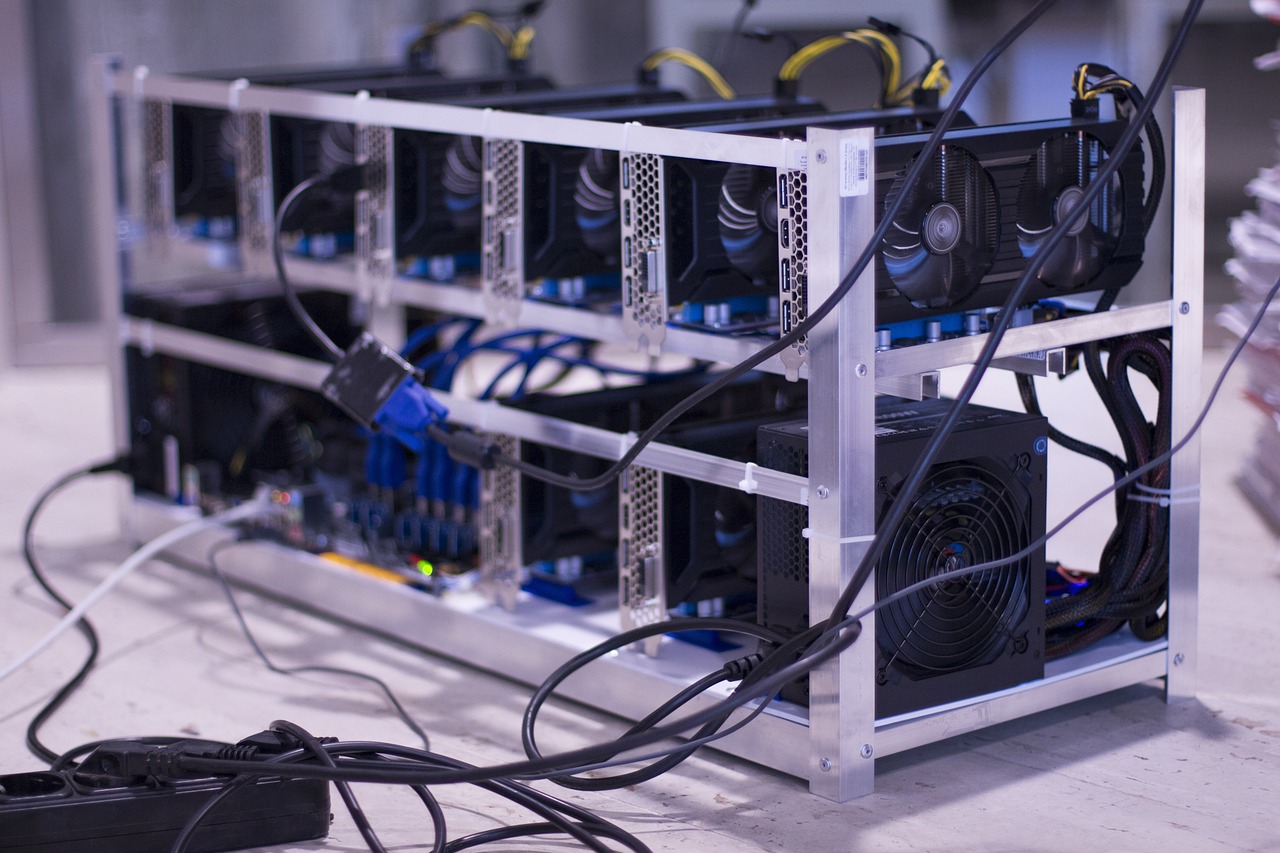
- High-End (Multi-ASIC or GPU Farm): Two L7 units (≈$6,600) or a multi-GPU rig (6× high-end cards at $2,000–$5,000 total) can push tens of GH/s of Scrypt hash power, but draw 6–10 kW and need robust PSUs and cooling.
Ethereum (Ethash) – Obsolete
- Since the Merge in September 2022, Ethereum no longer uses Proof-of-Work and cannot be mined.
- Legacy GPU rigs (e.g. RTX 3080 at 97.9 MH/s, 224 W) remain useful only for other Ethash-based coins like Ethereum Classic.
Solana (PoS) – Not Minable
- Solana is a Proof-of-Stake chain; you earn rewards by staking rather than mining.
- Running your own validator requires server-grade hardware: at least 12 cores/24 threads (ideally 16/32), 256 GB+ ECC RAM, and multiple NVMe SSDs for ledger, snapshots, and accounts (500 GB–1 TB each).
- Most individuals delegate to existing validators or use exchange-based “stake as a service.”
Key software includes CGMiner, BFGMiner, EasyMiner (for ASICs), or coin-specific miners (e.g. XMRig for Monero). You also need a wallet address to receive rewards. The setup (drivers, mining software) differs by OS:
Mining Software Comparison
| Software | Hardware Supported | Platforms | Notes |
|---|---|---|---|
| CGMiner | ASIC, FPGA, GPU | Win, Linux | Command-line; highly configurable; legacy GPU support in versions ≤3.7.2 |
| BFGMiner | ASIC, FPGA | Win, macOS, Linux | Dynamic clocking, monitoring; no GPU support |
| EasyMiner | ASIC, GPU, CPU | Windows only | GUI-based “point-and-click” setup for beginners |
| cpuminer-multi | CPU | Win, Linux | Fork of pooler’s cpuminer; simple CPU mining |
| MultiMiner | GPU, CPU | Win, Linux, macOS | GUI wrapper for various back-end miners; easy pool switching |
| LolMiner / Gminer | GPU | Win, Linux | Optimized Ethash/KawPow miners for NVIDIA/AMD cards |
For Windows you typically download an executable and edit a .bat file; on
Linux/macOS you either compile from source or install via package managers. Always match
software version to your hardware (e.g. CGMiner 3.7.2 for GPU mining) and keep drivers up to
date.
- Windows: GUI/Executable miners are common. For ASICs, you often access a web UI. For GPU mining, you install GPU drivers + miner software (e.g. NiceHash, MultiMiner).
- Linux: Command-line miners are typical. Many miners support Linux out of the box. You may compile from source or use package managers (e.g. apt-get install cgminer).
- macOS: Mining on Mac is limited. Some CLI miners (e.g. cpuminer, XMRig) have macOS builds, but GPU mining on Mac is rare due to driver support.
Regardless of OS, the steps are:
- Install or compile the miner software.
- Configure it with your wallet address and pool information (if using a pool).
- Run it.
- For pool mining: specify Pool URL, Worker ID, and your wallet address.
- For solo mining: run a full node and point your miner to it (typically only feasible for Bitcoin).
Mining Pools and Cloud Platforms
Mining pools are groups of miners who combine their computational resources to increase the
chances of earning block rewards.
Instead of mining alone (solo mining), which can be unpredictable and rarely profitable for
individuals, pool members share both the workload and the rewards. Each miner contributes their
hash power, and when the pool successfully mines a block, the reward is distributed among
participants based on their contribution. This approach provides more frequent, steady payouts
compared to solo mining.
Cloud mining platforms, on the other hand, allow users to rent mining hardware or hash power
remotely, eliminating the need to buy and maintain physical equipment. While convenient, cloud
mining often involves fees and contracts, and users should carefully research providers to avoid
scams or unprofitable terms.
- Bitcoin: Major pools are Foundry USA, Antpool, ViaBTC, F2Pool, Binance Pool. (These five account for most global hashrate.)
- Dogecoin/Litecoin: Large pools include F2Pool, Aikapool, ViaBTC, Multipool. Litecoin-specific pools include LitecoinPool.org (one of the oldest), ViaBTC (PPS payment, merged Doge mining),ProHashing (pays in various coins), and others like Antpool, LTC.top
- Ethereum: No mining pools (ETH is PoS now). For Ethereum Classic (if considered), pools include Ethermine, 2Miners, etc.
- Solana: No mining pools (PoS, see below).
You can check out this tutorial to set up a mining pool:
Profitability & Energy Usage: Top Mining Rigs (2025)
Below is the updated Profitability & Energy Usage table, now featuring only the most profitable SHA-256 and Scrypt miners—i.e. those yielding positive net profits at $0.10/kWh. We’ve included the newest top-performing Bitcoin ASICs and the leading Scrypt rigs (L7 & L9). “Est. Daily Profit” is revenue minus electricity cost at $0.10/kWh.
| Coin (Alg.) | Example Rig | Hashrate | Power | ~kWh/day | Est. Daily Profit | Rig Cost |
|---|---|---|---|---|---|---|
| Bitcoin (SHA-256) | Antminer S21 XP Hyd. | 473 TH/s | 5,676 W | 136.2 kWh | $23.82/day | $12,499 |
| Bitcoin (SHA-256) | Antminer S21 XP Imm. | 300 TH/s | 4,050 W | 97.2 kWh | ≈$15.00/day¹ | $7,368-8,399 |
| Bitcoin (SHA-256) | Bitmain Antminer S21+ | 225-235 TH/s | 3,564 W | 85.5 kWh | $6.81/day | $4,644 |
| Bitcoin (SHA-256) | MicroBT WhatsMiner M60S++ | 202 TH/s | 3,503 W | 121.4 kWh | $4.08/day | $3615.8 |
| Dogecoin/Litecoin | Bitmain Antminer L7 | 9.5 GH/s | 3,425 W | 82.2 kWh | $6.97/day | $9,399 |
| Dogecoin/Litecoin | Bitmain Antminer L9 | 17.6 GH/s | 3,360 W | 85.7 kWh | $14.70/day | $8,999.00 |
| Affordable Miners | ||||||
| Ethereum Classic (Etchash) | iPollo V1 Mini SE Plus | 200 MH/s | 116 W | 2.8 kWh | $0.60–$1.20/day | $250–$350 |
| Dogecoin/Litecoin (Scrypt) | Goldshell Mini Doge II | 420 MH/s | 400 W | 9.6 kWh | $0.50–$1.00/day | $250–$350 |
| Bitcoin (SHA-256) | Antminer S9 (used) | 13.5 TH/s | 1,300 W | 31.2 kWh | ~$0.10–$0.50/day* | $100–$200 |
¹ Antminer S21 XP Imm. profit is estimated by prorating the Hydra-cooled S21 XP Hyd’s per-TH profit to 300 TH/s (300 TH ÷ 473 TH × $23.82/day ≈ $15).
Notes on Key Rigs
- Antminer S21 XP Hyd. (473 TH/s) delivers the highest profit at $23.82/day, but commands a $14.5k upfront cost and requires 136 kWh daily Buy Antminer S21 XP Hyd.
- Antminer S21 XP Imm. (300 TH/s) trades peak output for a lower price tag (~$7.4k) and still nets ~$15/day after electricity. Buy Antminer S21 XP Imm.
- Antminer S21+ (225 TH/s) is a solid mid-range choice: $6.81/day profit at $4,644 purchase price. Buy Antminer S21+
- WhatsMiner M60S+ (202 TH/s) is competitive at $4.08/day, at at $3615.8 purchase price. Buy WhatsMiner M60S+
- Antminer L7 (9.5 GH/s) remains the top Scrypt ASIC, yielding $6.97/day for merged DOGE+LTC mining Buy Antminer L7.
- Antminer L9 (17.6 GH/s) is now profitable again, with $14.70/day on Scrypt at its $8,999.0 list price Buy Antminer L9
This selection ensures you’re looking at only positive-ROI hardware, from the absolute best profit-per-day leader (S21 XP Hyd.) down to solid mid-tier and Scrypt ASICs.
Steps to Start Mining
Bitcoin (BTC) Mining
-
Select and Prepare Hardware
Choose an ASIC miner—GPUs/CPUs are not practical for Bitcoin today.
Examples: Antminer S21 Pro (234 TH/s, 3,510 W), WhatsMiner M56S++ (230 TH/s, 5,060 W).
Set up in a cool, well-ventilated space with a stable power supply and Ethernet network.
-
Create a Bitcoin Wallet
Download Electrum (lightweight) or purchase a hardware wallet (Ledger/Trezor) for maximum security.
Install and securely back up your seed phrase.
-
Install Mining Software
Pool mining (recommended): download CGMiner, BFGMiner, or EasyMiner on Windows, Linux, or macOS.
Solo mining: install Bitcoin Core, sync the full blockchain (400+ GB), and use CGMiner pointed at your local node.
-
Configure Your Miner
Pool mining: in your miner's .conf or .bat file, enter the pool's stratum URL, your wallet address as "user," and a worker name as "pass" (usually "x").
Solo mining: configure CGMiner or your ASIC's web UI to connect to your node's IP and RPC port (default port 8332).
-
Start Mining
Run the mining software or power up the ASIC.
Monitor hash rate, accepted shares, and temperatures via the miner's web dashboard or CLI.
Payouts are automatically sent to your wallet—pool mining yields small frequent rewards, solo yields full block rewards (~3.125 BTC) but rarely.
-
(Optional) Cloud Mining
Sign up to NiceHash or BitDeer if you prefer leasing hash power—read contracts carefully to avoid low-yield agreements or scams.
Dogecoin (DOGE) Mining
-
Choose Mining Hardware
ASIC: Antminer L7 (9.5 GH/s, 3,425 W) is most efficient; costs ~$9,000.
GPU (beginner): any CUDA-capable NVIDIA card or AMD with OpenCL (inefficient vs. ASIC).
-
Create a Dogecoin Wallet
Download the official Dogecoin Core wallet or use a third-party hot wallet (Exodus, MultiDoge).
Back up your wallet.dat or seed phrase securely.
-
Install Mining Software
ASIC: configure via built-in web UI—no PC required, just network connection.
GPU/CPU: download cpuminer-scrypt, CGMiner (Scrypt), or MultiMiner on Windows/Linux/macOS and compile if needed.
-
Join a Mining Pool
Pick F2Pool, Aikapool, ViaBTC, or Multipool (fees ~1–2%).
Register and obtain the pool's stratum URL.
-
Configure and Start
ASIC: log in to the miner's UI, enter pool URL, username (your wallet.worker), and password (often "x").
Software: edit .bat or .conf:
cgminer --algo scrypt --url stratum+tcp://pool.example.com:3333 \
        --user YOUR_WALLET_ADDRESS.RIG1 --pass x
Begin mining, monitor hash rate and earnings on the pool dashboard.
Litecoin (LTC) Mining
Litecoin mining steps mirror Dogecoin's Scrypt process, but with LTC-specific pools and wallet.
-
Obtain Hardware
ASIC: Antminer L7 (8.8 GH/s, 3,425 W) or L9 (17.6 GH/s, 3,570 W) for best ROI.
GPUs: NVIDIA/AMD cards are possible but unprofitable long term.
-
Set Up a Litecoin Wallet
Options: Litecoin Core, Trust Wallet, Exodus, Ledger/Trezor for cold storage.
-
Install Mining Software
Download CGMiner, BFGMiner, or EasyMiner and ensure Scrypt support.
Install on Windows, Linux, or macOS.
-
Join a Pool
Recommended: LitecoinPool.org, F2Pool, ViaBTC (merged LTC + DOGE) with ~1% fees.
Sign up to get stratum URL.
-
Configure & Mine
Edit config with:
cgminer --algo scrypt \
        --url stratum+tcp://ltc.f2pool.com:8888 \
        --user YOUR_ACCOUNT.WORKER --pass x
Run and monitor via pool dashboard; payouts sent to your LTC wallet daily.
Ethereum (ETH) Staking (PoS)
ETH mining is obsolete post-Merge; staking replaces mining.
-
Acquire and Prepare ETH
Purchase at an exchange (e.g., Coinbase, Binance) or transfer existing ETH to a self-custody wallet (MetaMask, Ledger).
-
Choose a Staking Method
Solo Staking: run an Ethereum validator with 32 ETH minimum using an ETH client (e.g., Prysm, Lighthouse) on Linux or cloud VPS.
Pooled/Liquid Staking: stake any amount via Lido, Rocket Pool, or exchanges—no 32 ETH barrier.
Centralized Exchange: stake through Coinbase, Kraken, etc., where they manage the validator for you.
-
Set Up (Solo)
Install an ETH consensus and execution client; sync to the Beacon Chain.
Run eth2.0-deposit-cli to generate keys and deposit 32 ETH to the official deposit contract.
Start your validator client; ensure high uptime to avoid penalties.
-
Stake via Lido (Example Pooled)
Go to lido.fi, connect MetaMask.
Enter amount of ETH to stake and submit the transaction.
Receive stETH tokens representing your stake.
-
Monitor and Earn
Rewards accrue automatically; view balances in your wallet.
Unstaking remains disabled until future network upgrades; you can trade stETH for ETH via decentralized exchanges.
Solana (SOL) Staking
-
Create and Fund a Wallet
Install Phantom Wallet on browser or mobile, create a seed-phrase wallet, and note it down securely.
Buy or transfer SOL into Phantom.
-
Choose Staking Method
Native Staking: lock SOL directly and delegate to a validator.
Liquid Staking: receive LSTs (e.g., JitoSOL) for flexibility in DeFi.
-
Delegate Your SOL
Open Phantom, click "Solana" → "Start earning SOL" → choose "Native Staking" or "Liquid Staking".
Select a validator from the ranked list (APY, total stake).
Enter amount and click "Stake." Transaction completes in seconds; rewards start in ~2 days (one epoch).
-
(Optional) Unstake
Native: click "Your stake" → "Unstake" → "Withdraw Stake"; wait 2–3 days to receive SOL back.
Liquid: click on your LST token → "Unstake" (immediate or delayed options).
Conclusion
Overall, one guide cautions that miners should weigh costs vs. rewards: “Before investing in mining equipment or contracts, ensure you conduct thorough research” kucoin.com. In practice, mining is most reliable for those with cheap electricity and experience; novices are advised to start small. Sources: Authoritative mining guides cointelegraph.com lightspark.com, official docs (Cointelegraph, Dogecoin site), pool statistics, have been used above.
You can also check out this amazing tutorial, on how to build a profitable GPU mining rig in 2025. We recommend this video for a step-by-step guide on how to build a GPU mining rig. Besides it tells you, all the problems you might encounter while building a GPU mining rig, and how to solve them.